Catloaf Software Blog

Fretuoso for Android Is Now in Open Beta

17 septembre 2026

Fretuoso® is now available on Android in open beta. If you’ve wanted to practice your fretboard knowledge on an Android device, we’d love for you to try it and tell us what you think.

After more than a decade exclusively on iOS, we’ve finally taken the jump and brought Fretuoso to Android. Throughout the port, we’ve focused on preserving feature parity with the Apple platforms, bringing the same practice tools and learning experience to Android phones and tablets.

Premium is free for all Android beta testers during the beta period. You can explore the complete experience while helping us refine the app.

Fretuoso: All the strings, one app, with App Store and Google Play badges

Try the Android open beta on Google Play.

Get to Know Your Fretboard

Finding a note shouldn’t mean counting up from an open string every time. Fretuoso helps you build that familiarity through short practice sessions, with support for guitar, bass, ukulele, banjo, and mandolin.

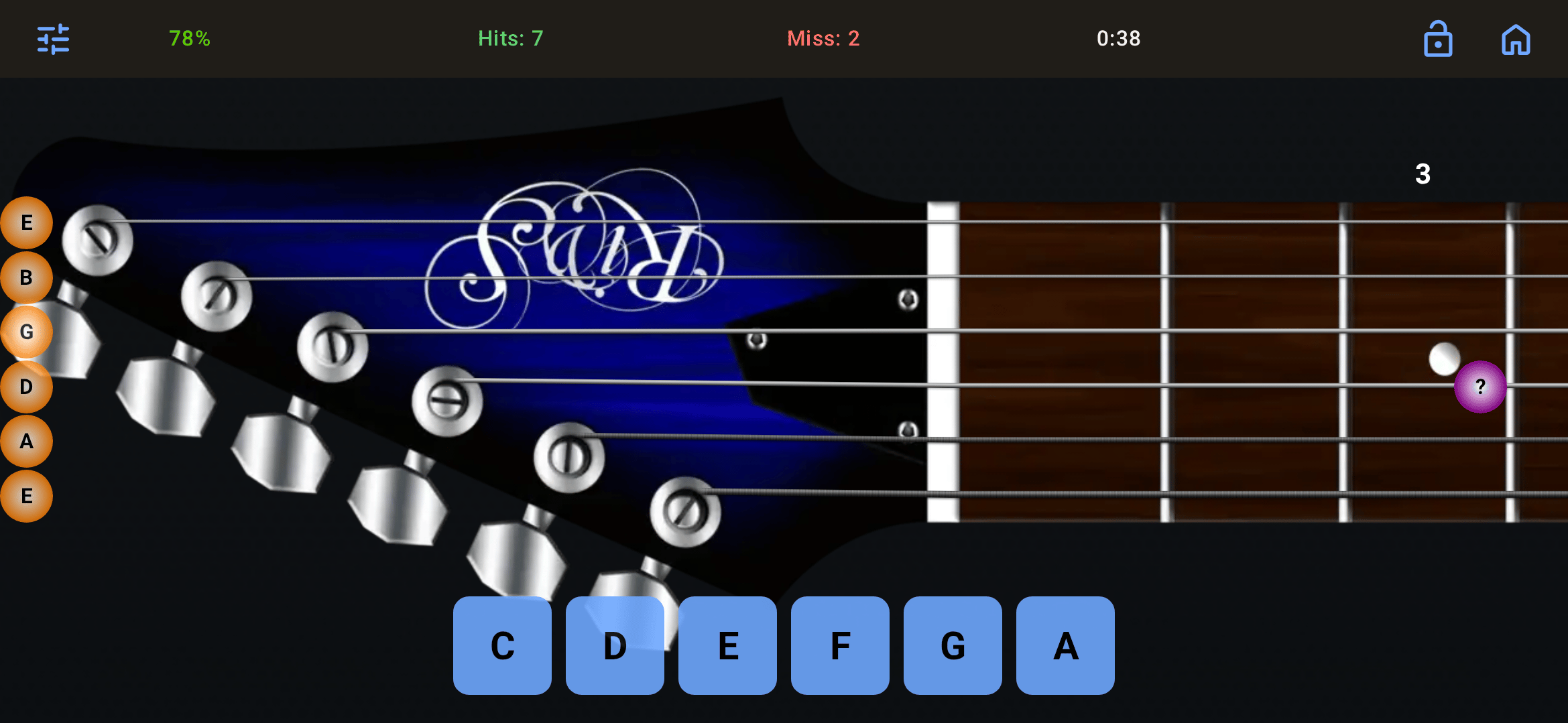
Fretuoso for Android Training mode with a live fretboard note prompt, answer choices, timer, accuracy, hits, and misses

Choose the way you want to practice:

  • Training mode lets you learn at your own pace, with adaptive exercises that give more attention to the notes you find difficult.
  • Game mode adds timed challenges when you’re ready to test your recall.
  • Staff learning mode connects written notes with their positions on the fretboard.
  • Free play mode gives you room to explore notes and tunings.

You can customize your tuning and practice area, then use detailed statistics to see where you need more work. Whether you’re learning your first instrument or picking up another, a few spare minutes can become a useful practice break.

Help Us Shape the Android App

This is an open beta, and your feedback is the reason we’re opening it up. Premium access is free throughout the Android beta, and we want to hear how Fretuoso fits into your practice routine and how it behaves on the Android devices you use every day.

Found something confusing? A screen that doesn’t look right? An exercise that isn’t working as expected? Send us your feedback at beta@fretuoso.app. For bugs, include your device model, Android version, and the steps that led to the problem. A screenshot can help too.

We’d also love to know which instrument you’re learning and what would make your next practice session more useful.

Join the Beta

Head to Fretuoso on Google Play to get started, or visit fretuoso.app to learn more about the app.

Thank you for helping us bring Fretuoso to Android. Pick your instrument, try a session, and let us know how it goes!

Texts From Jesus, Oscar Wilde & Founding Fathers on Android

19 juillet 2026

Three familiar voices have arrived on Android. Texts From Jesus, Texts From Oscar Wilde, and Texts From Founding Fathers are all now available from Google Play.

Texts From Jesus and Texts From Oscar Wilde previously had Android editions years ago. We are delighted to bring them back in a new form, rebuilt and refreshed with inspiration from the current iOS apps. They are joined by Texts From Founding Fathers, bringing the words of eight major figures from the American founding to Android as well.

TL;DR: Texts From Jesus and Texts From Oscar Wilde return to Android in newly rebuilt editions, joined by Texts From Founding Fathers. All three are fully localized in many languages—including Spanish, French, German, Korean, and Japanese—and feature bookmarks, configurable daily notifications, sharing, and home-screen widgets. Download them from Google Play today.

A Daily Quote, Wherever You Want It

Each app is built around a simple idea: make memorable words easy to discover and revisit. Open the app when you want to browse, set a daily notification for a regular moment of reflection, or place a widget on your home screen so that a quote is already waiting when you pick up your phone.

The new Android apps share a common set of features:

  • Bookmark quotes you want to find again.
  • Configure daily notifications to fit your schedule.
  • Share quotes with friends or through your favorite apps.
  • Add home-screen widgets for convenient access to featured quotes.
  • Use the complete app in many languages, including Spanish, French, German, Korean, Japanese, and more.

The experience is consistent across the family, while each app keeps the character of its own source material. Each one is fully localized—not just its menus—with support for many languages, including Spanish, French, German, Korean, Japanese, Italian, Portuguese, and more.

Texts From Jesus

Texts From Jesus app showing a biblical verse in a text-message conversation

Texts From Jesus presents verses in the familiar form of a text-message conversation. You can choose between formal and modern verse styles, making it easy to read the words in the tone that feels most natural to you.

The app also offers optional gnostic texts for readers who want to explore beyond the standard collection. Whether you use it for a quiet moment, a daily reminder, or to save a passage that speaks to you, the app keeps the focus on the words themselves.

Download Texts From Jesus on Google Play.

Texts From Oscar Wilde

Texts From Oscar Wilde app presenting a witty Oscar Wilde quotation as a text message

Texts From Oscar Wilde brings Wilde’s wit, observations, and memorable turns of phrase to your Android device. The original style presents the quotations as written, while two playful alternatives change the tone: LOLWilde and Buck Wilde.

Switch styles depending on whether you want Wilde as published or something more irreverent. Then bookmark the sharpest lines, share them, or let the widget serve up a little wit from your home screen.

Download Texts From Oscar Wilde on Google Play.

Texts From Founding Fathers

Texts From Founding Fathers app displaying a historical quotation in a text-message conversation

Texts From Founding Fathers gathers quotations from George Washington, Benjamin Franklin, Thomas Jefferson, Thomas Paine, Alexander Hamilton, John Adams, James Madison, and John Jay.

Choose one founder when you want to focus on a particular perspective, or select anyone and let the app vary the voice behind each quote. It is a compact way to encounter ideas from across the founding era, then bookmark the passages you want to consider again.

Download Texts From Founding Fathers on Google Play.

Welcome Back to Android

These releases mark a welcome return. Jesus and Wilde have a history on Android, but these are modern apps shaped by everything we have learned from their current iOS counterparts. With Founding Fathers alongside them, Android users can now choose among scripture, literature, and history—or keep all three close at hand.

Visit each app’s official site to learn more, or follow the Google Play links above to get started. We hope the widgets, notifications, bookmarks, and sharing tools make it easier to find a meaningful, clever, or thought-provoking quote every day.

You can also explore more of our mobile work in the Catloaf Software portfolio.


Frequently Asked Questions

Which Texts From apps are available on Android?

Texts From Jesus, Texts From Oscar Wilde, and Texts From Founding Fathers are now available on Android through Google Play.

Do all three Android apps have the same core features?

Yes. All three include bookmarks, configurable daily notifications, sharing, and home-screen widgets. Each app also has options tailored to its own collection of quotes.

Are Texts From Jesus and Texts From Oscar Wilde new to Android?

They were available on Android years ago and are now back as newly rebuilt and refreshed apps inspired by their current iOS editions.

Which languages do the Android apps support?

All three apps are fully localized in many languages, including Spanish, French, German, Korean, Japanese, Italian, Portuguese, and more.

Introducing Voicemails for the Text With Apps

7 mai 2026

Voicemails in the Text With apps: voice messages from supported figures

We are introducing Voicemails, a major new feature for our AI texting apps that lets supported figures respond beyond the chat bubble. Across the Text With apps, you can ask for a voice message during a conversation, or turn an existing text reply into audio and hear it in that figure’s own voice.

TL;DR: Voicemails let you request spoken messages from supported figures in Text With Jesus, Text With History, and Text With Authors. They are organized, searchable, and never expire. Free credits are available for everyone to try, Premium subscribers receive 30 Voicemail credits each month, and more supported figures are being added over time.

What Are Voicemails?

Voicemails work like voice messages on your phone: you ask a supported figure to leave a message, then listen whenever you want. Each supported figure has a distinct voice and personality, so the message feels closer to a personal note than a standard text-to-speech reading.

The feature is designed for moments when reading is not enough. A blessing, encouragement, historical reflection, study prompt, or literary note can feel different when it is spoken aloud. Instead of replacing chat, Voicemails add another layer to it.

You can use Voicemails in two ways:

  • Request a new voice message from a supported figure during a chat.
  • Convert an existing text reply into a Voicemail and listen to it later.

Once created, your Voicemails are organized in the app, searchable, and never expire, so you can return to a favorite message whenever you want.

Where Can You Try Them?

Voicemails are available across the Text With family where supported figures have voice support enabled. That includes experiences in Text With Jesus, Text With History, and Text With Authors, with more figures being added over time.

Each app uses Voicemails a little differently because each app has a different kind of conversation:

App How Voicemails Help
Text With Jesus Hear reflective messages, encouragement, and spiritual guidance.
Text With History Listen to historical figures explain decisions, events, and context.
Text With Authors Hear literary figures discuss writing, interpretation, and craft.

If a figure supports Voicemails, the app will show the option while you are chatting. If the option is not available for a figure yet, check back later as support expands.

You can also hear before you ask. Each figure with Voicemails enabled has a voice preview button on the app page, so you can quickly play a short sample and get a feel for the voice before starting a conversation or spending credits.

Why We Built Voicemails

Voice changes the feel of a conversation. Reading a reply is fast and useful, but hearing a message can make a moment more memorable, especially when the conversation is personal, reflective, or tied to a character whose voice you can imagine.

For faith conversations, Voicemails can make a short reflection easier to revisit during the day. For history, they can make a figure’s perspective feel more immediate. For literature, they can make a passage, writing prompt, or author insight feel closer to a spoken classroom moment.

The goal is simple: keep the control and convenience of chat, while adding the warmth of audio when it helps.

How Voicemail Credits Work

All users receive free credits to try Voicemails. Premium subscribers receive 30 free Voicemail credits every month as part of their subscription, and users who want more can buy additional credit packs directly in the app.

Requesting a new Voicemail and converting an existing text message both use Voicemail credits. One credit creates one Voicemail, whether you request it from scratch or generate it from an existing reply. That keeps the feature flexible: you can ask for a message in the moment, or wait until a reply stands out and convert it afterward.

Your saved Voicemails remain available after they are created. They are organized and searchable in the app, and they do not expire.

Practical Ways To Use Voicemails

Voicemails are most useful when you want to save, replay, or step away from the screen. They are not just a novelty; they can turn a quick chat answer into something you carry with you and find again later.

Try using them for:

  • A morning reflection from a spiritual figure in Text With Jesus.
  • A study recap from a historical figure in Text With History.
  • A writing prompt from a favorite author in Text With Authors.
  • A saved explanation you want to replay before a class, meeting, or commute.
  • A converted reply that felt especially helpful, memorable, or comforting.

Because Voicemails can be requested or converted, you do not have to decide in advance which answers matter. Keep chatting naturally, then turn the best moments into audio when you want to revisit them.

What Comes Next

Voicemails will continue expanding to more figures across the Text With apps. We are starting with supported voices where the experience feels strongest, with the goal of eventually bringing Voicemails to every figure.

You can preview voice samples on the app pages now. Look for the play button on each Voicemail-enabled figure.

Open your app, start a conversation with a supported figure, and try requesting a Voicemail. The next message you save might be one you listen to, not just one you read.


Frequently Asked Questions

Can I convert old text replies into Voicemails?

Yes. You can convert an existing text reply from a supported figure into a Voicemail and hear it in that figure’s voice. Conversions use the same Voicemail credits as newly requested voice messages.

Do all figures support Voicemails?

Not yet. Voicemails are expanding across the Text With apps, and supported figures will show the option while you chat. Our goal is to eventually support every figure, with more voices added as the rollout continues.

Can I preview a figure’s voice first?

Yes. Every figure with Voicemails enabled has a voice preview button on the app page. Tap the play button to hear a quick sample before you request a Voicemail or convert a text reply.

Do Premium subscribers get Voicemail credits?

Yes. Premium subscribers receive 30 free Voicemail credits every month as part of their subscription. All users also receive free credits to try the feature.

Can I buy more Voicemail credits?

Yes. Voicemail credit packs are available in packs of 10, 25, or 100 credits. Credits purchased in packs never expire, so you can use them whenever you want.

Get the app and start chatting today.

2025 Year in Review: Scaling Our Text With AI Apps Across Mobile and Web

18 février 2026

2025 was a major execution year for our AI products at Catloaf Software.

Instead of chasing broad expansion, we focused on making the Text With product line better, faster, and more dependable across iOS, Android, and Web.

What Actually Drove 2025

The foundation for this work was laid in late 2024:

In 2025, we doubled down on product quality and AI delivery around those releases.

What We Improved In 2025

Across the Text With family, our work centered on:

  • Improving response quality and UX consistency for conversational flows
  • Hardening production reliability for AI-backed features
  • Tightening release and QA workflows across mobile and Web surfaces
  • Continuing content and interaction improvements for educational use cases

This is the less flashy but essential work that makes AI apps genuinely usable at scale.

Why This Matters

For users, it means a smoother and more useful day-to-day experience inside Text With apps.

For our team, it means stronger foundations for the next wave of product features and safer iteration speed.

If you are building AI features with OpenAI or Google APIs and need support across mobile and Web delivery, see our services or contact us.

Announcing "Text With Jesus", Our Newest Innovation in Interactive Learning

19 juin 2023

We have always been driven by a single mission: to create mobile applications that engage, educate, and inspire. Today, we’re excited to announce the latest innovation born from this mission: “Text With Jesus.”

Icon of Text With Jesus

“Text With Jesus” is a revolutionary new application that allows users to explore the biblical narratives like never before. Leveraging advanced AI technology, powered by the ChatGPT language model from OpenAI, the app offers an opportunity for users to engage in real-time text conversations with beloved figures from the Bible, including the Holy Family, Apostles, and various prophets from the Old Testament.

We envisioned an application that could offer an interactive and personal supplement to traditional Bible study methods, and we believe “Text With Jesus” does just that. With this app, users can ask questions, seek guidance, and engage in personal dialogues that deepen their understanding of their faith.

Screenshot of Text With Jesus

Beyond individual study, “Text With Jesus” can also serve as a valuable resource for small groups, Sunday School classes, and church sermons. It provides a unique platform to foster further discussion and reflection, making biblical study a more interactive and engaging process.

However, the appeal of “Text With Jesus” extends beyond just the Christian community. Given that the Bible is not only a religious text but also a cornerstone of Western literature and culture, anyone interested in literature, history, or philosophy may find “Text With Jesus” a fascinating tool to explore these age-old narratives in a fresh, modern way.

We are thrilled to make “Text With Jesus” available for download on the Apple iOS, iPadOS and macOS platforms. With a clean, user-friendly interface, the app is designed to offer a seamless and enjoyable user experience. The app is a free download, with an optional in-app subscription to unlock unlimited messages and all Biblical figures.

At Catloaf Software, we are proud to continually push the boundaries of what’s possible in educational technology. “Text With Jesus” represents our latest effort to transform everyday learning experiences into interactive journeys of discovery.

We encourage everyone, regardless of their faith or background, to give “Text With Jesus” a try and experience the Bible like never before. As always, we’re eager to hear your feedback, and we look forward to continuing to innovate and serve our user community.

Stay tuned for future updates and new features as we continue to enhance your “Text With Jesus” experience!

If you are exploring iOS product development for your own app, visit our services page or contact us to discuss your roadmap.

Download on the App Store

New Texts From Bernie Sticker Pack for iMessage

23 janvier 2021

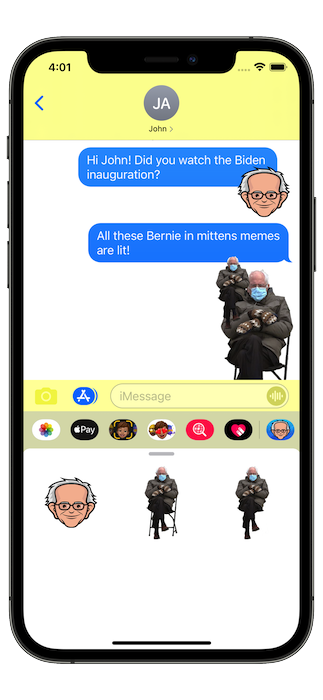
Following the Presidential Inauguration earlier this week, which among other things produced the very prolific Bernie Mittens meme, we have now updated our Texts From Bernie app and added a new iMessage sticker pack.

Screenshot of Bernie stickers

Featured prominently among those new stickers is the iconic image of Bernie sitting with his mittens, which you can now easily paste all over your text conversations.

Enjoy! This is a new feature of our FREE app!

See our full app portfolio on the home page and read more product updates on our blog.

Download on the App Store

Texts From Trump App Has Been Removed

10 janvier 2021

In light of recent events unfolding in Washington, we have decided to permanently retire our Texts From Donald Trump app from the iOS App Store.

As of today, the app is no longer available for download. Support will no longer be provided for the app and it will not see any further updates.

If you previously downloaded the app, it will continue to work on your devices as before. It will not be available to install on any new devices.

We humbly encourage you to try out our Texts From Founding Fathers app instead, which provides much of the same features albeit without the baggage of quotes from a seditious ex-president.

You can explore our broader app lineup on our home page or follow new releases on our blog.

New website for the Fretuoso app

15 février 2020

We are proud to unveil the new web home for our Fretuoso® app, now live at fretuoso.app!

The new website is easier to navigate and more up to date with the latest Web technologies. A notable addition is the new documentation page, a new easy way to access reference material previously only available within the app. We will be updating it as we add new features, and it is now an easy way to explore the features of the app without having to install and launch it.

Also of note, our new changes page outlines the changes in the history of the app, outside of the App Store pages and blog posts.

If you are building your own Apple platform app and need engineering support, visit our services page or contact us.